


V2Box
4.4290.00 Reviews
App Specs
- Version
- 5.3.4
- Updated On
- License
- Free
- Downloads
- 5,000,000+
- Developer
- HexaSoftware
- Categories
- Tools
- Platform
- Android
Screenshots
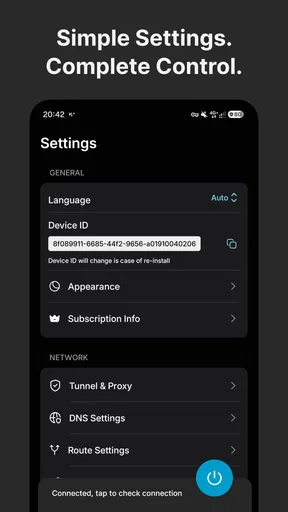
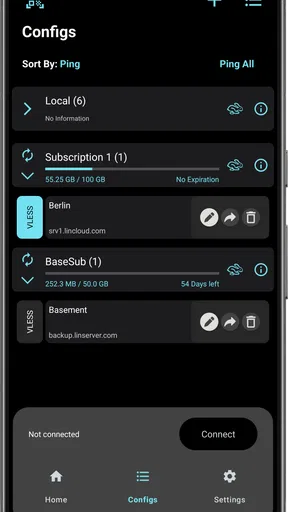
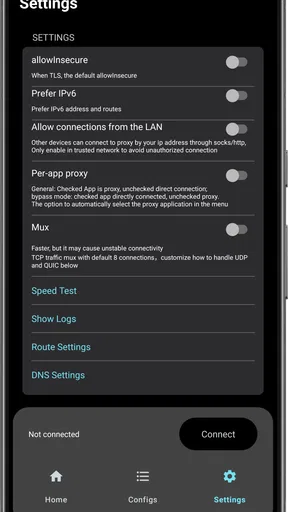
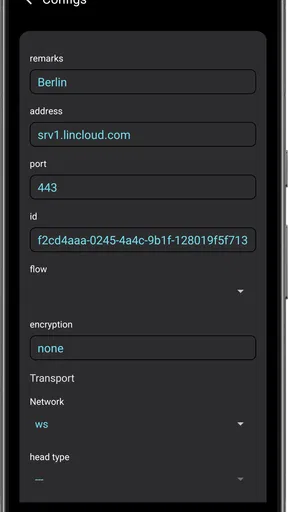
 Analysis by AppCompare
When several people share a phone or tablet, a connection tool can become part of the household routine rather than a private, one-person app. That changes what matters: who knows which connection is active, whether someone else can make sense of the settings, and whether the person using it understands what it does. V2Box is worth considering for households that already have a compatible connection configuration, but I would not treat installing it as the same thing as buying a ready-made VPN service.
A shared device needs clear boundaries
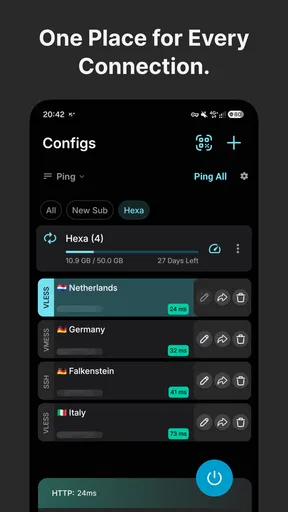
The app is a free tools app from HexaSoftware, with optional in-app purchases priced from $0.99 to $7.99 per item. Its focus is handling connection types such as VLESS, VMess, Trojan, SSH, Hysteria and Ping Tunnel. That makes it different from the usual VPN app that supplies a service and asks you to choose a location. With V2Box, a usable configuration is central to getting connected; simply installing the app does not provide a server or guarantee that a connection will work.
On a family tablet, I would agree on who is allowed to add, edit or remove configurations before anyone starts experimenting. This is a practical boundary, not a special family feature: a changed profile can affect the next person who uses the device. If one person manages the setup, it helps to explain how other household members can tell whether the connection is on and whom to ask if it stops working. I would also avoid passing around configuration details casually, since access depends on the information and service behind each profile.
Setup is simpler when one person owns the details
V2Box is best suited to someone who has been given connection details by a provider, administrator or technically confident household member and is willing to enter or import them carefully. If you are choosing a tool for a relative who wants a single button and a built-in list of VPN locations, a mainstream consumer VPN may be a better match. V2Box’s flexibility is useful, but it shifts more responsibility to the person setting it up.
A sensible first run is to add one known-good configuration, test it on a trusted network, and check that ordinary browsing works before relying on it away from home. Keep a note of which profile is intended for which purpose, without recording sensitive connection details somewhere everyone can access. If a profile fails, changing several settings at once makes troubleshooting harder; I would change one thing, test again, and ask the person or service that supplied the configuration to verify its details.
Coordination matters more than a long server list
For a shared device, the useful question is not simply whether there are many connection options. It is whether people can coordinate without accidentally replacing a working setup. One household member might need a particular profile for a work-related connection, while another uses the device for routine browsing. Naming profiles in a clear, non-sensitive way and agreeing not to edit someone else’s setup can prevent avoidable confusion.
There is also a useful distinction between managing a connection and providing one. V2Box can work with several tunneling protocols, but the app itself should not be confused with a subscription service that supplies infrastructure, support and ready-to-use locations. Before choosing it, ask: do I already have connection details, and do I know who maintains them? If the answer to both is no, the extra setup may outweigh the flexibility.
Worth Reading Before You Choose

EA SPORTS FC Mobile 26 Is a Bigger Football Game, but It Takes Time

Flipboard Shows What News Apps Must Do Beyond the Feed

Switching to Android Auto Means Rethinking Your Driving Routine

Google Calendar Makes a Crowded Week Easier to Manage

Ludo King Makes the Most of the Minutes Between Plans

Baby Panda World Brings Quick Play to Modern Phones, but Its Game Library Feels Busy
Age and trust in a household
The content rating is Everyone, and the app is suitable for general audiences in that sense. Still, an age label is not a substitute for explaining what a network connection tool changes. For a younger person using a shared device, I would make sure they understand that the app does not make every website trustworthy or remove the need to protect passwords and personal information. A VPN-style connection can change how traffic is routed; it is not a general-purpose safety guarantee.
Trust also depends on the configuration source. A profile is only as dependable as the service or administrator behind it, so I would not add unfamiliar settings just because someone forwarded them. For household use, it is reasonable to have one adult or technically confident user check where a configuration came from and explain its intended use. This is especially important when several people rely on the same device and may assume that an active connection means every online risk has been handled.
Living with V2Box
First things first, getting V2Box up and running is a breeze. You can grab it from the App Store or Google Play, and the installation is as straightforward as it gets. Once you’ve got it installed, firing it up is just a tap away. The user interface is refreshingly simple. It’s not cluttered with a million options, which I appreciate. You know, sometimes less is more, right?
Features That Stand Out
Okay, let's talk features. One thing I love about V2Box is its speed. Unlike other VPNs that slow you down, this one keeps things zippy. Whether you're streaming, downloading, or just browsing, it feels like there's no VPN at all. Plus, the app offers a whole bunch of server locations. Want to pretend you're in Japan while sitting in your living room? Easy peasy.
Another cool feature is its strong encryption. I mean, we all want to keep our data safe, right? With military-grade encryption, you can rest easy knowing your data is locked down tighter than Fort Knox. Plus, with its no-logs policy, your browsing history is your business and no one else’s.
Interface and Usability
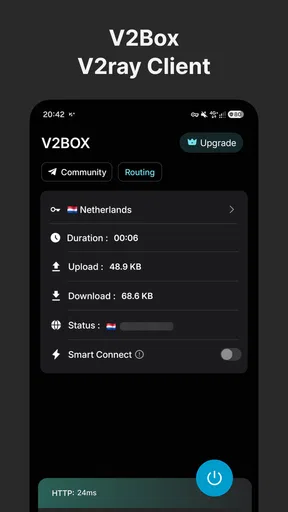
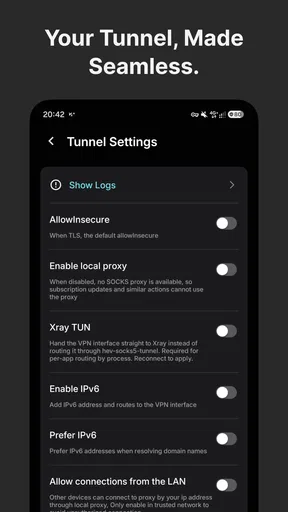
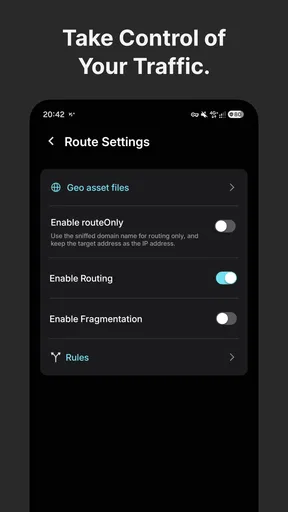
Now, let’s chat about the interface. I’m all about apps that don’t make me feel like I need a tech degree to use them. With V2Box, you get a clean, intuitive interface. Everything is where you expect it to be. Need to switch servers? It’s just a tap away. Want to customize your settings? Easy to find and adjust. It’s designed for everyone, from the tech-savvy to the tech-challenged.
That simplicity is most useful after the initial setup. A person who only needs to select an existing profile may find the day-to-day interaction manageable, while the person responsible for obtaining and maintaining profiles still needs to understand the configuration. In other words, a clean interface can reduce friction, but it cannot make an unknown connection source trustworthy or replace the knowledge needed to fix a broken setup.
Real World Use
So, what's it like using V2Box in the real world? Pretty darn good. I’ve used it while traveling, and it’s great for accessing region-blocked content. Think of those times you’ve been out of the country and couldn’t watch your favorite shows. Major bummer, right? With this app, those problems are a thing of the past.
Also, for those of us who enjoy a good coffee shop with free Wi-Fi, V2Box is a lifesaver. Public Wi-Fi can be a hacker's playground, but with this VPN, you're protected. You can sip your latte without worrying about someone snooping on your connection.
For a more ordinary household scenario, imagine taking a shared tablet to a café while one person handles messages and another checks a travel booking. The practical step is to confirm that the intended profile is active before using the public network, then avoid assuming that connection status alone makes every account or website safe. If the profile will not connect, I would switch to a trusted network or postpone sensitive activity rather than treating repeated retries as proof that the setup is secure.
Compared with a conventional VPN app, V2Box is the more configurable choice for people who already have protocol-specific details and want to manage them in one place. A regular provider’s app is usually more convenient for someone who expects the provider to supply the service and guide them through setup. Neither approach is automatically right for every use: the important trade-off is control and compatibility on one side, versus a more bundled, guided experience on the other.
Wrapping It Up
All in all, if you’re in the market for a VPN that’s fast, reliable, and easy to use, V2Box should definitely be on your radar. It’s got the speed, security, and simplicity that makes it stand out from the crowd. Whether you’re a globe-trotter or just someone who values privacy, this app has got your back.
In practical terms, I’d recommend it to someone comfortable handling connection profiles, especially if a particular setup calls for one of the protocols it supports. I’d steer a beginner who wants an all-in-one service toward a provider’s own app instead, and I would not choose V2Box solely on the assumption that installing it supplies a VPN connection. It is free to install, rated 4.4 on average from around 82,000 ratings, and has more than 5 million installs; optional purchases are available. It is for Everyone, and version 5.3.4 requires Android 7.0 or later.
So, go ahead and give it a whirl. You might just find it’s exactly what you’ve been looking for to make your online experience safer and more enjoyable. Happy surfing!
Pros
- User-friendly interface for easy navigation.
- High-speed connection with minimal lag.
- Supports multiple protocols for flexibility.
- Regular updates enhance performance.
- Strong encryption ensures data security.
Cons
- Limited free version features.
- Occasional server connectivity issues.
- No dedicated customer support chat.
- Requires stable internet for optimal use.
- Battery consumption can be high.
FAQs for V2Box
What is V2Box and what does it do?
V2Box is a versatile networking app designed to provide users with secure and private internet connections. It is primarily used to bypass geo-restrictions and enhance online privacy. By using advanced encryption protocols, V2Box ensures that your internet activities remain private and protected from prying eyes.
Is V2Box free to use, or does it require a subscription?
V2Box offers both a free version and a subscription-based model. The free version provides basic functionalities, while the premium subscription unlocks advanced features such as faster connection speeds, additional server locations, and more robust security options. Users can choose a plan that best fits their needs.
How user-friendly is V2Box for someone not tech-savvy?
V2Box is designed with an intuitive interface that caters to both tech-savvy users and beginners. The app provides a straightforward setup process with easy-to-follow instructions. Additionally, it features a well-organized dashboard that allows users to quickly connect to servers and manage settings without technical expertise.
What platforms are compatible with V2Box?
V2Box is available for both Android and iOS platforms, making it accessible to a wide range of mobile users. It is optimized to function seamlessly across different devices, ensuring consistent performance whether you're using a smartphone or tablet. Regular updates ensure compatibility with the latest operating systems.
How secure is V2Box in protecting my data?
V2Box employs state-of-the-art encryption technologies to safeguard user data and maintain privacy. It supports protocols such as OpenVPN and WireGuard, which are renowned for their security. This ensures that your online activities are not only anonymous but also protected from hackers and surveillance.


